






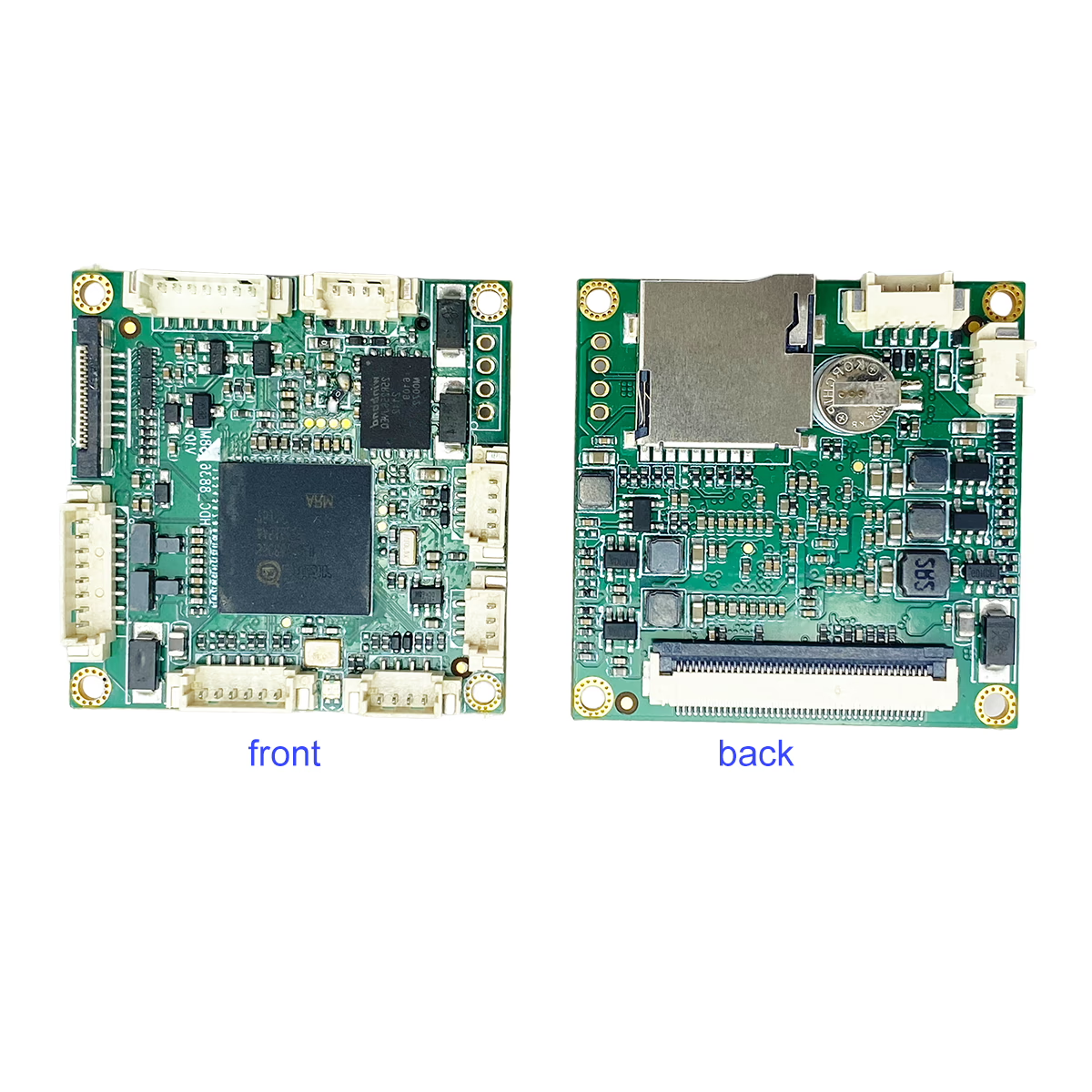
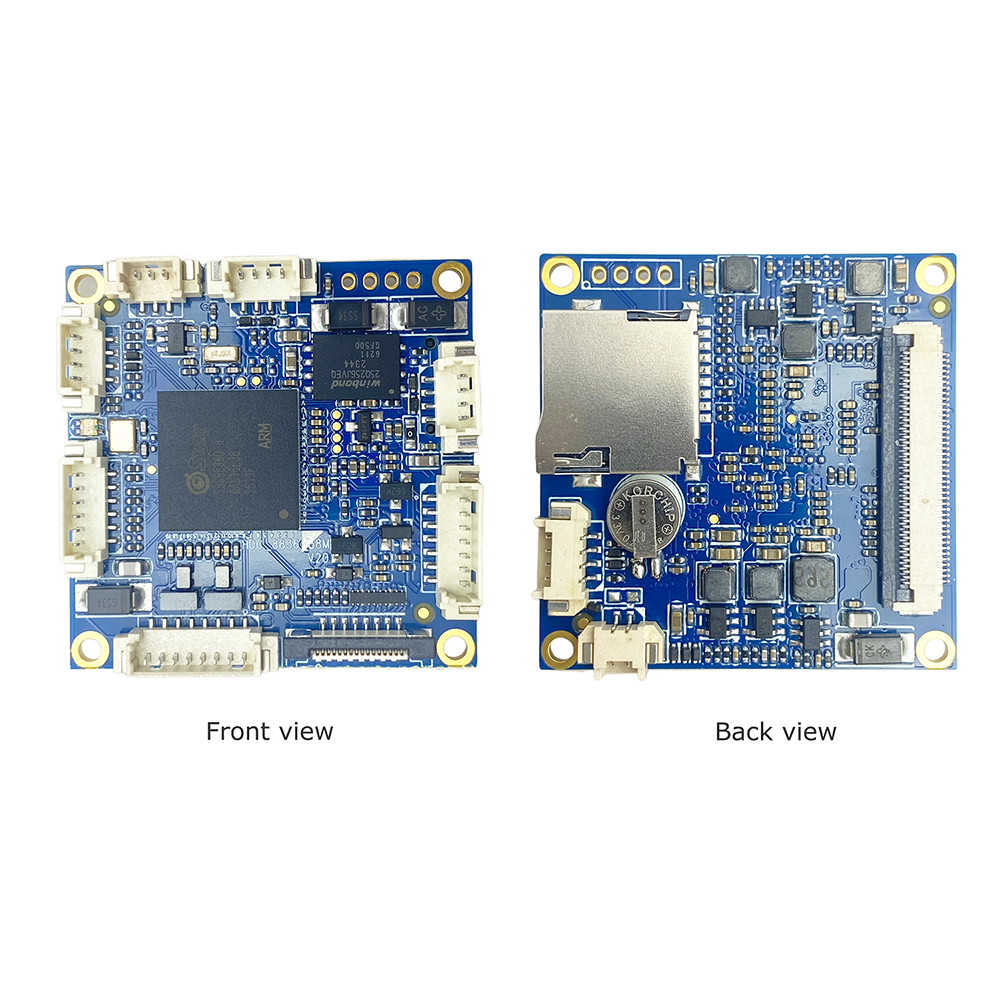

ইউএসবি (ইউভিসি) এনালগ ভিডিওতে (CVBS) কনভার্টার বোর্ড
NTSC থেকে USB ক্যামেরা / PAL কম্পোজিট ভিডিও আউটপুট
সুচিপত্র
সংক্ষিপ্ত বিবরণ
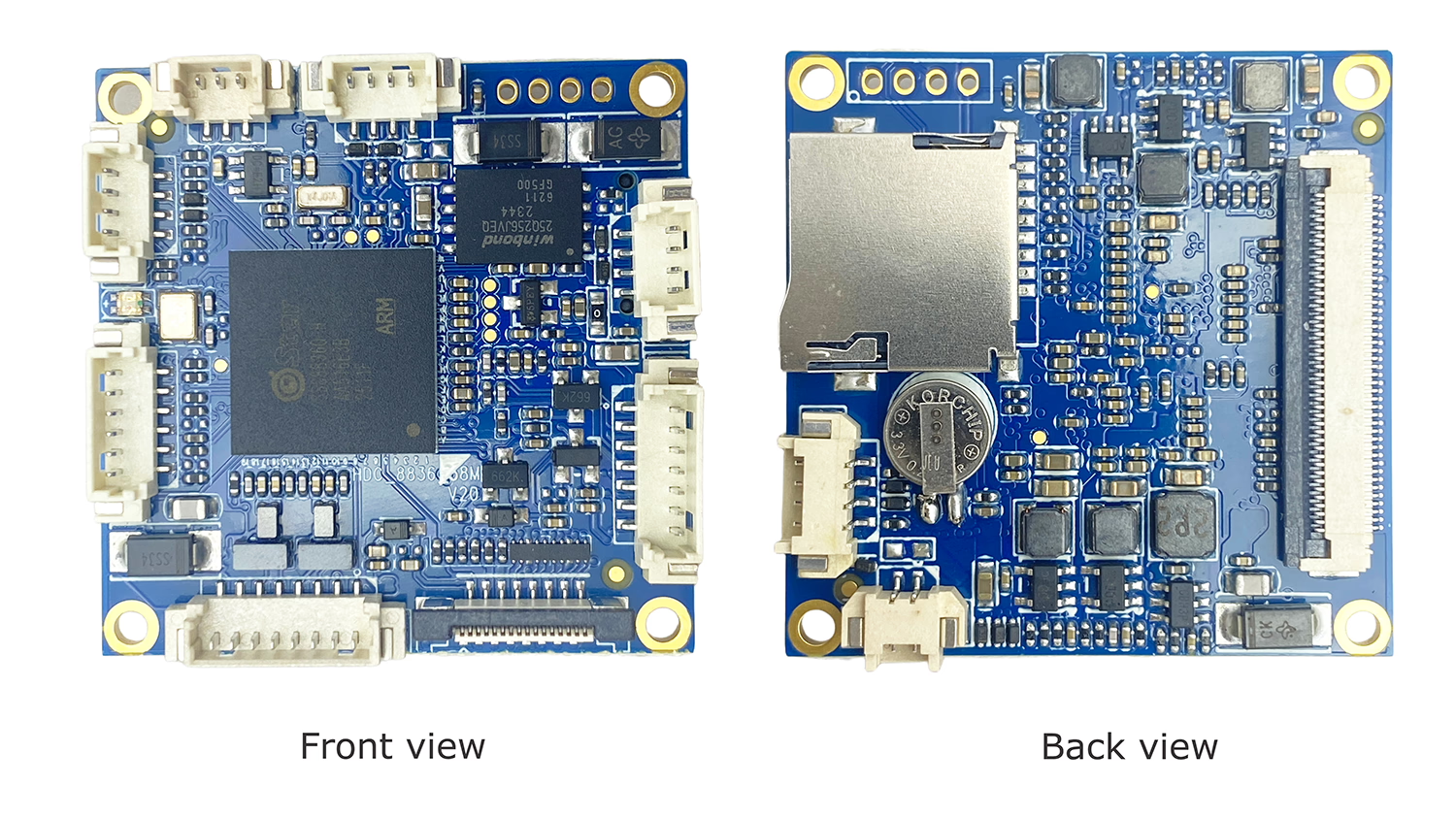
দ্য ইউএসবি (ইউভিসি) এনালগ ভিডিওতে (CVBS) কনভার্টার বোর্ড রূপান্তর করার জন্য ডিজাইন করা একটি কম্প্যাক্ট এবং নির্ভরযোগ্য ভিডিও রূপান্তর মডিউল UVC-সঙ্গত ইউএসবি ক্যামেরা ভিডিও মধ্যে স্ট্যান্ডার্ড এনালগ কম্পোজিট ভিডিও (CVBS) আউটপুট.
এই মডিউল আধুনিক সক্ষম করে ইউএসবি ক্যামেরা সঙ্গে ব্যবহার করা লিগ্যাসি এনালগ ভিডিও সিস্টেম, উভয় সমর্থন NTSC এবং PAL মান. এটি FPV ড্রোনের জন্য আদর্শ, এনালগ মনিটর, ডিভিআর সিস্টেম, শিল্প সরঞ্জাম, এবং এমবেডেড প্ল্যাটফর্ম যেখানে অ্যানালগ ভিডিও ইনপুট প্রয়োজন.
প্লাগ-এন্ড-প্লে UVC সামঞ্জস্য সহ, কম বিলম্ব প্রক্রিয়াকরণ, এবং স্থিতিশীল CVBS আউটপুট, এই কনভার্টার বোর্ড ইউএসবি-টু-অ্যানালগ ভিডিও ইন্টিগ্রেশনের জন্য একটি সহজ এবং সাশ্রয়ী সমাধান প্রদান করে.
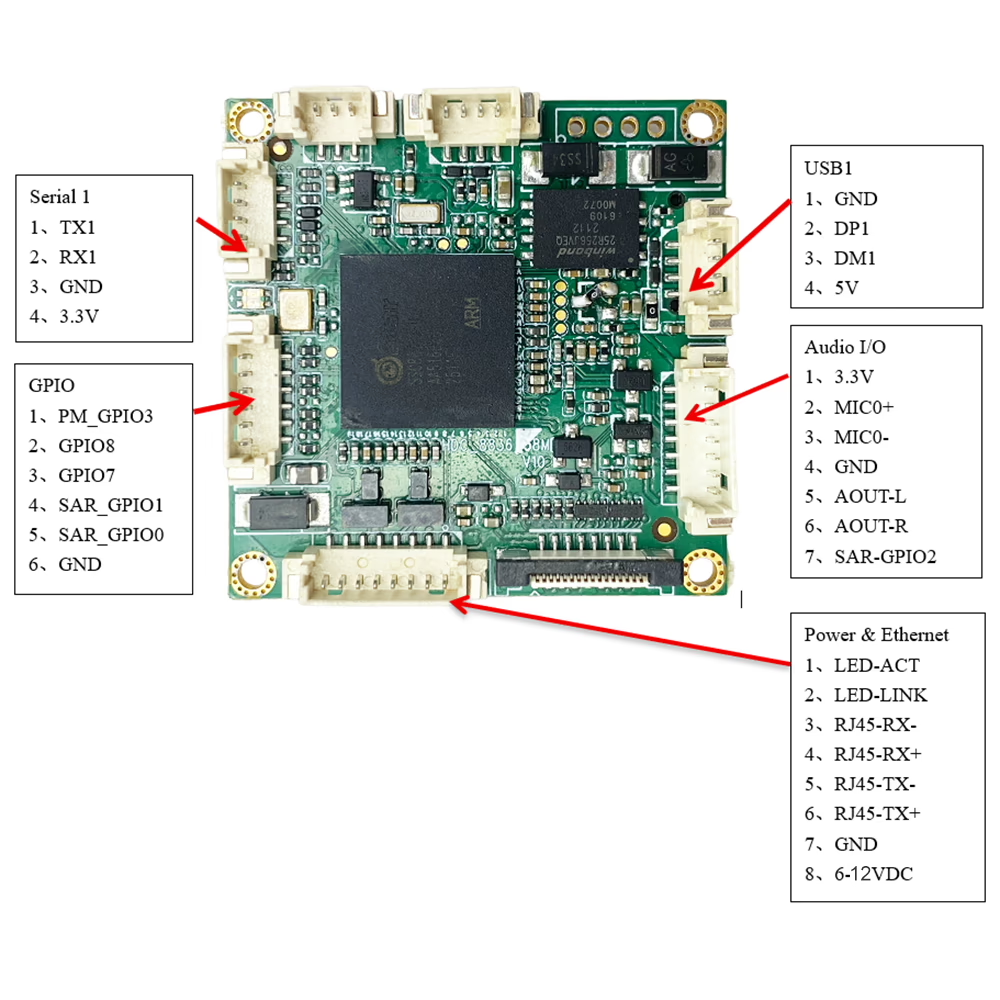
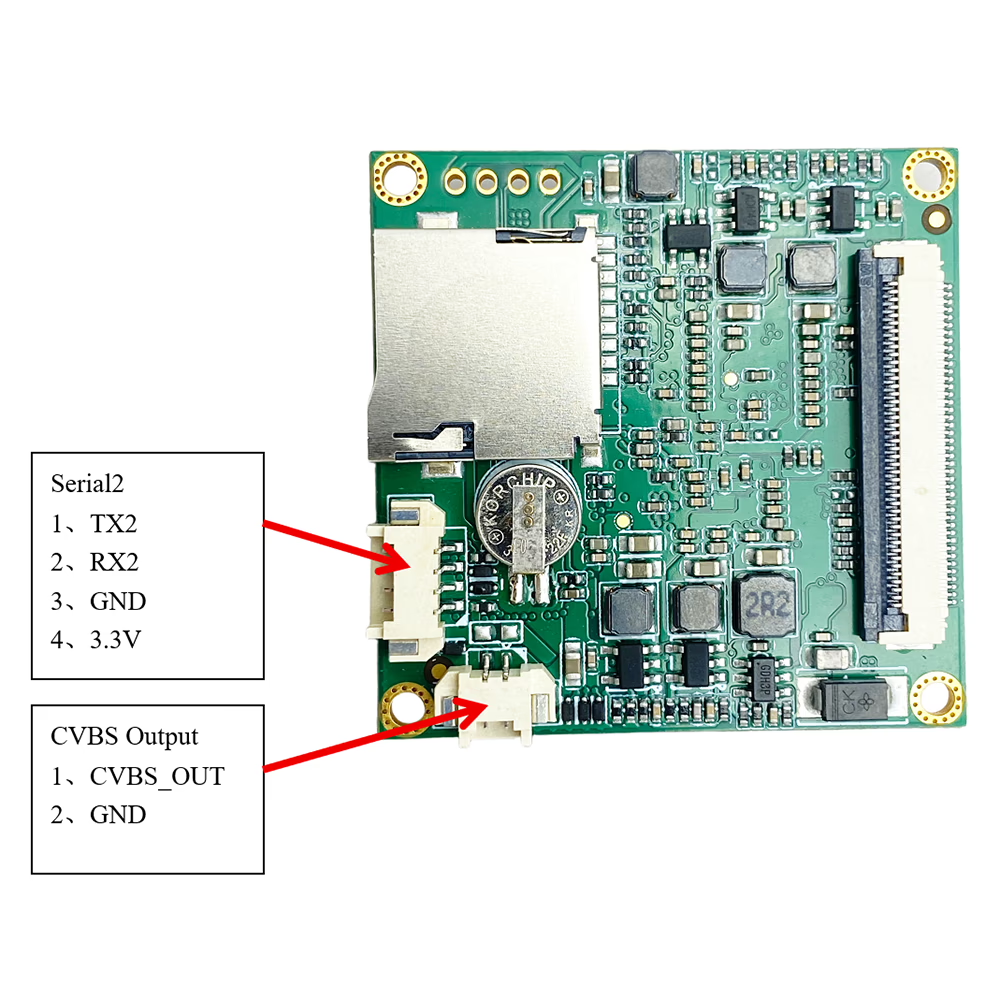
বৈশিষ্ট্য
-
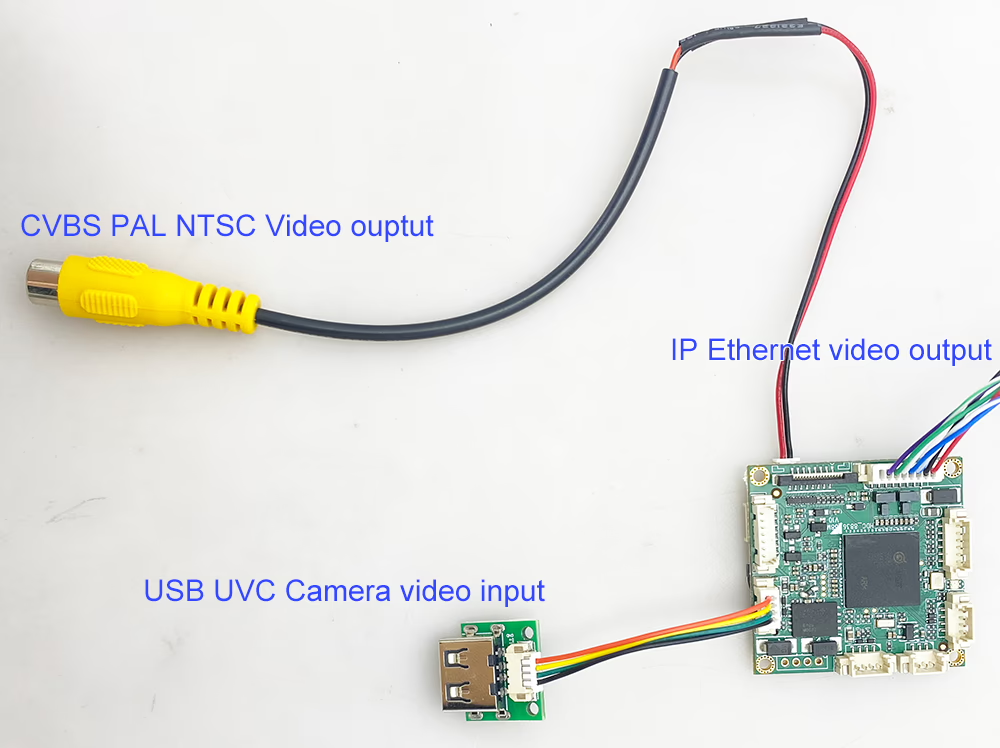
ইউএসবি (ইউভিসি) সিভিবিএস রূপান্তর
UVC USB ক্যামেরা ভিডিওকে সরাসরি এনালগ কম্পোজিট ভিডিও আউটপুটে রূপান্তর করে. -
এনটিএসসি / PAL সমর্থিত
বিশ্বব্যাপী সামঞ্জস্যের জন্য স্ট্যান্ডার্ড NTSC এবং PAL CVBS ফর্ম্যাটগুলিকে সমর্থন করে. -
রিয়েল-টাইম ভিডিও আউটপুট
কম লেটেন্সি ইউএসবি থেকে এনালগ রূপান্তর FPV এবং রিয়েল-টাইম পর্যবেক্ষণের জন্য উপযুক্ত. -
ইউএসবি ক্যামেরা সামঞ্জস্য
স্ট্যান্ডার্ড UVC USB ক্যামেরা সমর্থন করে (দৃশ্যমান আলো এবং সামঞ্জস্যপূর্ণ তাপীয় ক্যামেরা). -
CVBS ভিডিও আউটপুট ইন্টারফেস
ডেডিকেটেড AV / এনালগ ডিভাইসের সাথে সহজে একীকরণের জন্য CVBS ভিডিও আউটপুট সংযোগকারী. -
প্লাগ অ্যান্ড প্লে অপারেশন
UVC ক্যামেরার জন্য কোন বিশেষ ড্রাইভারের প্রয়োজন নেই. -
কমপ্যাক্ট ডিজাইন
ছোট ফর্ম ফ্যাক্টর, এমবেডেড সিস্টেম এবং স্থান-সীমিত ইনস্টলেশনের জন্য উপযুক্ত. -
নমনীয় শক্তি ইনপুট 6-12ভী
মোবাইল এবং শিল্প পরিবেশে স্থিতিশীল অপারেশনের জন্য ডিজাইন করা হয়েছে.
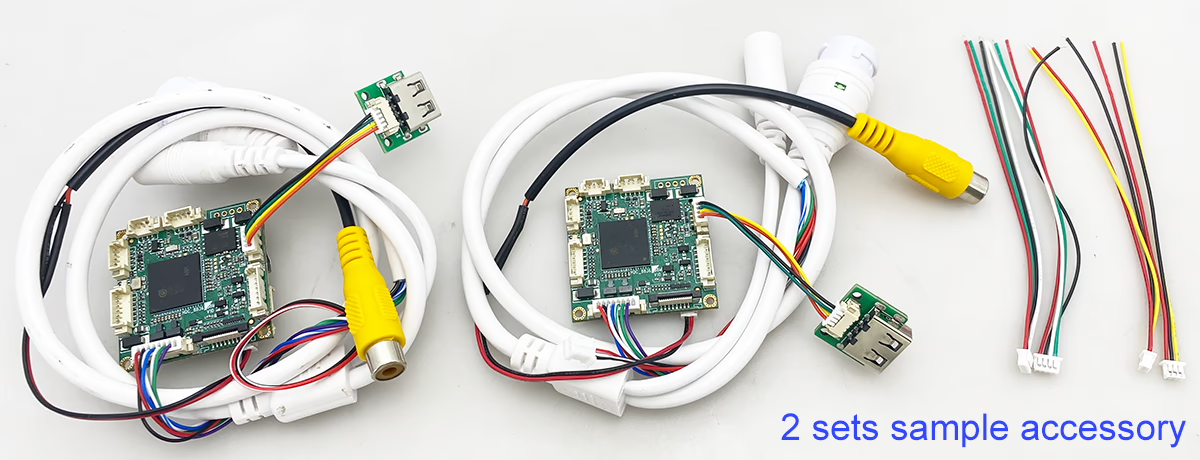
বিশেষ উল্লেখ
মডেল: UVC-CVBS-কনভার্টার
ভিডিও ইনপুট:
-
1 × ইউএসবি ইউভিসি ক্যামেরা ইনপুট
-
1080P পর্যন্ত USB ক্যামেরা ইনপুট সমর্থন করে (CVBS আউটপুটের জন্য ডাউনস্কেল করা হয়েছে)
ভিডিও আউটপুট:
-
1 × সিভিবিএস (যৌগিক ভিডিও)
-
আউটপুট মান: এনটিএসসি / অন্তরঙ্গ বন্ধু
-
এনালগ ভিডিও ফরম্যাট: CVBS (এর)
ভিডিও প্রসেসিং:
-
রিয়েল-টাইম ডিজিটাল থেকে অ্যানালগ ভিডিও রূপান্তর
-
USB ক্যামেরা ইনপুটের জন্য স্বয়ংক্রিয় বিন্যাস অভিযোজন
অদৃশ্যতা:
-
FPV এবং মনিটরিং অ্যাপ্লিকেশনের জন্য উপযুক্ত অতি-লো লেটেন্সি
পাওয়ার সাপ্লাই:
-
ডিসি ইনপুট (প্রকল্পের প্রয়োজনীয়তার উপর ভিত্তি করে কাস্টমাইজযোগ্য)
অপারেটিং তাপমাত্রা:
-
-20°C থেকে +70°C
মাত্রা:
-
কম্প্যাক্ট এমবেডেড বোর্ড নকশা (OEM কাস্টমাইজযোগ্য)
অ্যাপ্লিকেশন
-
এফপিভি ড্রোন এবং ইউএভি সিস্টেম
ইউএসবি ক্যামেরা থেকে এনালগ FPV মনিটর বা ভিডিও ট্রান্সমিটার. -
এনালগ মনিটর এবং ডিসপ্লে
লিগ্যাসি AV ডিসপ্লেগুলির সাথে কাজ করতে USB ক্যামেরাগুলিকে সক্ষম করে৷. -
ডিভিআর এবং রেকর্ডিং সিস্টেম
বিদ্যমান এনালগ DVR-এর জন্য CVBS ইনপুট সামঞ্জস্য প্রদান করে. -
শিল্প এবং এমবেডেড সিস্টেম
ইউএসবি ভিশন ডিভাইসগুলি এনালগ কন্ট্রোল প্ল্যাটফর্মে একত্রিত. -
নিরাপত্তা এবং পরিদর্শন সরঞ্জাম
বিদ্যমান পরিকাঠামোর জন্য অ্যানালগ ভিডিও আউটপুট প্রয়োজন.

অনবরত জিজ্ঞাসিত প্রশ্ন
প্রশ্নঃ: Why does the image of my USB video to CVBS PAL video encoder board stay green?
একটি: A green image usually indicates no signal input or that the device is in standby mode. Please check the following:
- Ensure that your source device is powered on and properly connected.
- Verify that the signal cable (যেমন, ইউএসবি) is not too long or damaged, as excessive length may cause signal interruption.
- Try using a shorter or different cable to see if the issue persists.
- Test via network output: Our USB to CVBS encoder board also supports network video streaming. You can connect it to a network cable and use a VLC player to view the video stream. If the video stream is normal, the issue is likely in the CVBS output or connection. If the stream is still green, the problem is likely with the input signal.
প্রশ্নঃ: What frame rate does the USB to CVBS converter board use when opening the camera?
একটি: ডিফল্টরূপে, the board opens the camera at 1920 × 1080 resolution with 30 FPS (1080গার্ড ব্যবধান).
If the camera’s maximum supported resolution is lower than 1080P, the board will automatically open the camera at the highest resolution supported by the camera.
প্রশ্নঃ: Does the board generate log files that customers can upload for troubleshooting?
একটি: The board does not generate detailed log files for upload.
For troubleshooting and debugging, তুমি পারবে connect through the serial port (UART) to obtain the boot/startup logs, which can then be shared with our support team for analysis.
প্রশ্নঃ: কি ধরনের USB ক্যামেরা সমর্থিত?
একটি: কনভার্টার সমর্থন করে UVC-সম্মত ইউএসবি ক্যামেরা, স্ট্যান্ডার্ড দৃশ্যমান-হালকা USB ক্যামেরা এবং সামঞ্জস্যপূর্ণ তাপীয় ইমেজিং ক্যামেরা সহ.
Q2 এর: কি এনালগ ভিডিও ফরম্যাট সমর্থিত?
একটি: বোর্ড আউটপুট CVBS (যৌগিক ভিডিও) এবং উভয় সমর্থন করে NTSC এবং PAL মান.
চতুর্থাংশ 3: এটা কি ড্রাইভার বা সফ্টওয়্যার প্রয়োজন?
একটি: না. স্ট্যান্ডার্ড UVC ক্যামেরা স্বয়ংক্রিয়ভাবে স্বীকৃত হয়, এবং ভিডিও রিয়েল টাইমে CVBS আউটপুটে রূপান্তরিত হয়.
Q4 ই: আমি কি NTSC এবং PAL এর মধ্যে স্যুইচ করতে পারি??
একটি: হাঁ. সিস্টেম বা আঞ্চলিক প্রয়োজনীয়তার উপর ভিত্তি করে আউটপুট ভিডিও মান নির্বাচন করা যেতে পারে.
প্রশ্ন 5: আমি কি একাধিক USB ক্যামেরা সংযোগ করতে পারি?
একটি: না. সিস্টেম সমর্থন করে শুধুমাত্র একটি USB ক্যামেরা ইনপুট. USB হাব বা একাধিক ক্যামেরা স্যুইচিং সমর্থিত নয়.
প্রশ্ন 6: এই মডিউল HDMI বা IP ভিডিও আউটপুট করতে পারেন?
একটি: এই মডেলের জন্য বিশেষভাবে ডিজাইন করা হয়েছে USB to analog CVBS and IP Ethernet video conversion.
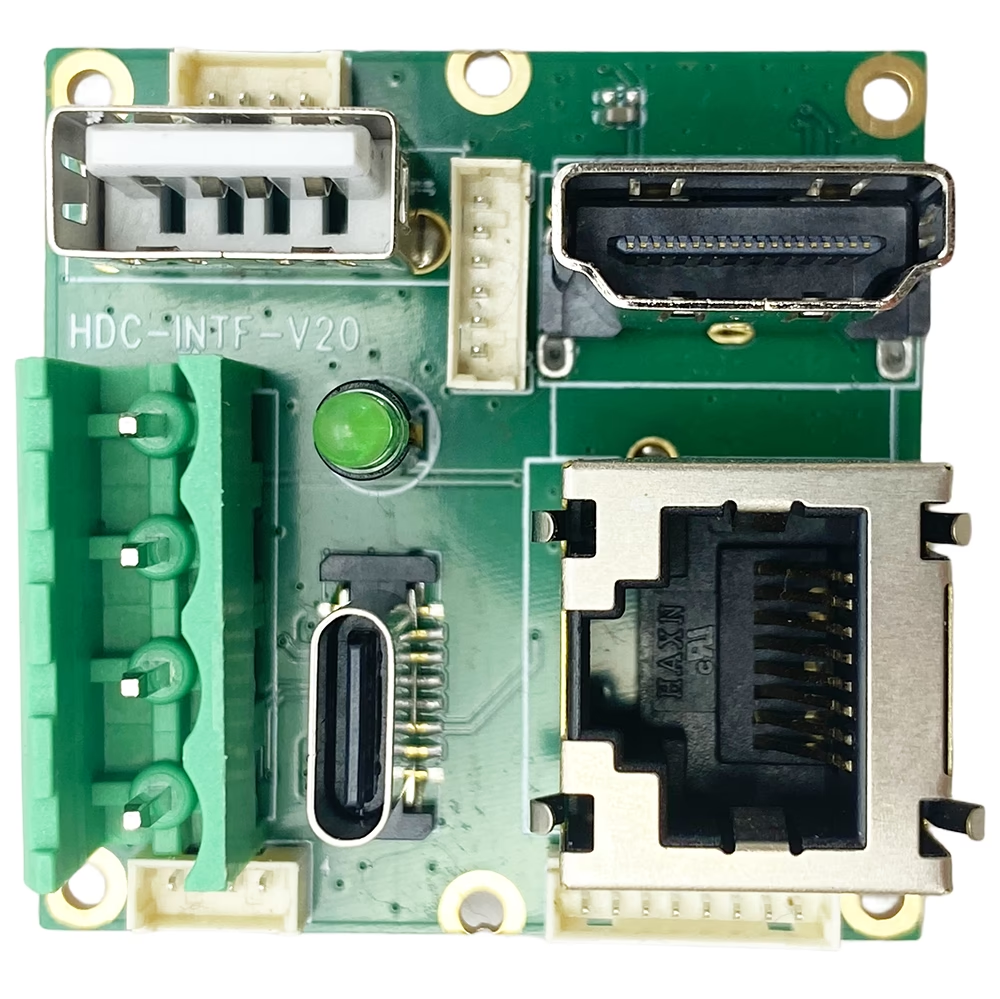
আপনার প্রয়োজন হলে এবং HDMI আউটপুট, আমরা একটি প্রদান করতে পারেন অতিরিক্ত HDMI আউটপুট সম্প্রসারণ বোর্ড.
প্রশ্ন 7: এটি কি FPV অ্যাপ্লিকেশনের জন্য উপযুক্ত??
একটি: হাঁ. কম লেটেন্সি সিভিবিএস আউটপুট এটিকে এফপিভি ড্রোনের জন্য উপযুক্ত করে তোলে, অ্যানালগ ট্রান্সমিটার, এবং রিয়েল-টাইম মনিটরিং সিস্টেম.
প্রশ্ন ৮: CVBS আউটপুট সংযোগকারী কাস্টমাইজ করা যেতে পারে??
একটি: হাঁ. CVBS আউটপুট ইন্টারফেস এবং সংযোগকারী প্রকার OEM বা ODM প্রকল্পের জন্য কাস্টমাইজ করা যেতে পারে.
প্রশ্ন 9: এই কনভার্টার এর মূল উদ্দেশ্য কি?
একটি: এটা অনুমতি দেয় আধুনিক ইউএসবি ক্যামেরা সঙ্গে ব্যবহার করা উত্তরাধিকার এনালগ ভিডিও সরঞ্জাম যার জন্য NTSC বা PAL CVBS ইনপুট প্রয়োজন.
প্রশ্ন 10: এই USB থেকে CVBS কনভার্টারের কাজের তাপমাত্রা পরিসীমা কত?
একটি: এর স্ট্যান্ডার্ড অপারেটিং তাপমাত্রা ইউএসবি থেকে সিভিবিএস কনভার্টার বোর্ড পরীক্ষিত এবং হতে যাচাই করা হয়েছে -20° সে থেকে +50 ডিগ্রি সেন্টিগ্রেড. এটি বেশিরভাগ পরিবেশগত পরিস্থিতিতে ইউএসবি ক্যামেরা থেকে এনালগ ভিডিও রূপান্তরের জন্য নির্ভরযোগ্য কর্মক্ষমতা নিশ্চিত করে, শিল্প সহ, FPV ড্রোন, এবং এমবেডেড সিস্টেম অ্যাপ্লিকেশন.
এখন, এর বাইরে অপারেশন -20°C বা তার উপরে +50°C সম্পূর্ণরূপে যাচাই করা হয় নি. আপনি একটি বিস্তৃত তাপমাত্রা পরিসীমা প্রয়োজন হলে, সম্ভব আলোচনা করতে আমাদের সাথে যোগাযোগ করুন কাস্টমাইজেশন বিকল্প.
প্রশ্নঃ: ভিডিও দেরি কিসের (বিলম্ব) এই ইউএসবি থেকে সিভিবিএস কনভার্টার?
একটি: এই ভিডিও বিলম্ব ইউএসবি থেকে সিভিবিএস কনভার্টার বোর্ড প্রায় হয় 100 মিলিসেকেন্ড. এই অতি-লো লেটেন্সি একটি USB ক্যামেরা থেকে মসৃণ এবং রিয়েল-টাইম এনালগ ভিডিও আউটপুট নিশ্চিত করে, যেমন অ্যাপ্লিকেশনের জন্য এটি আদর্শ তৈরীর এফপিভি ড্রোন, শিল্প পর্যবেক্ষণ, ডিভিআর সিস্টেম, এবং এমবেডেড ভিডিও সমাধান.
প্রশ্নঃ: Does the USB-to-CVBS module provide vibration damping or image stabilization for vehicle applications?
একটি: না. This module is only a USB video to CVBS conversion board. It does not perform any image processing.
বিশেষভাবে:
-
মডিউল আউটপুট exactly the same image it receives from the USB camera.
-
No vibration damping, no electronic image stabilization (EIS), এবং no image correction are applied.
-
If the camera image contains vibration or shaking (উদাহরণ স্বরূপ, when installed on a moving vehicle), this vibration will also appear in the CVBS output.
If vibration reduction is required, it must be handled by:
-
একটি USB camera with built-in optical or electronic stabilization, অথবা
-
An external image processing system before the USB video is fed into this module.
The USB-to-CVBS board itself functions purely as a video format converter, not an image enhancement or stabilization device.
প্রশ্নঃ: What remote access and software customization options are supported?
একটি: The device supports Telnet access, কিন্তু does not support SSH. SDK-based secondary development is not supported, and customer-side software development is not open.
জন্য general software requirements or standard functional modifications, customers only need to provide detailed specifications. আমাদের engineering team will implement the required changes directly after technical evaluation. No SDK development or programming is required from the customer.
প্রশ্নঃ: How to upgrade the firmware?
একটি: To install or apply the update, use our IPC Search Windows Tool by following these steps:
- Install and launch IPC Search on a Windows PC.
- Connect the device to the same network as the PC.
- Use IPC Search to detect the device.
- Load the provided upgrade package into the tool.
- Execute the upgrade process via IPC Search.
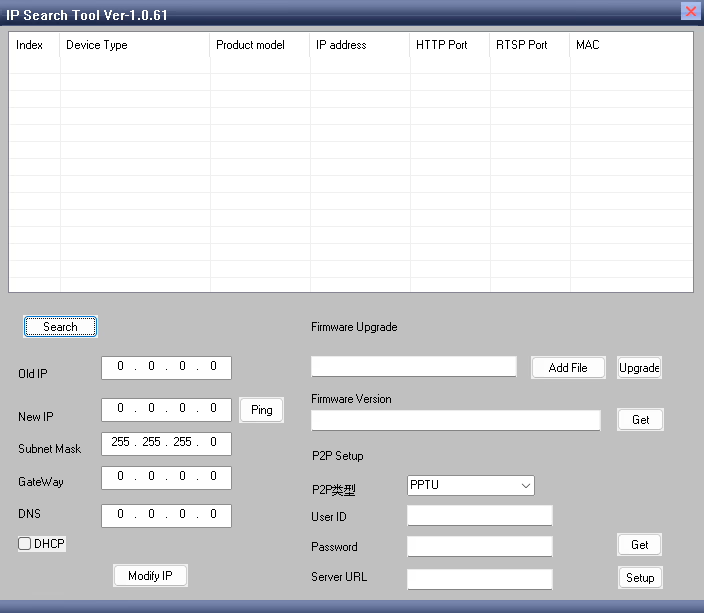
Download link, আইপি অনুসন্ধান টুল no Linux, only Windows OS.
You can use this software to perform various functions, সুদ্ধ: Setting the gateway, Modifying the IP address, Configuring the P2P server, Performing software upgrades, And other device management tasks.
প্রশ্নঃ: Why can my USB to CVBS encoder be discovered by the IPC search tool, but I still cannot open the web management page in the browser even after entering the correct IP address?
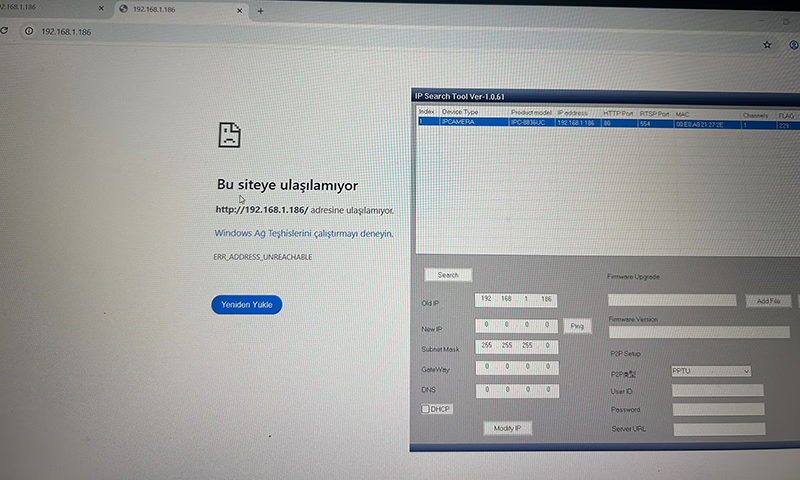
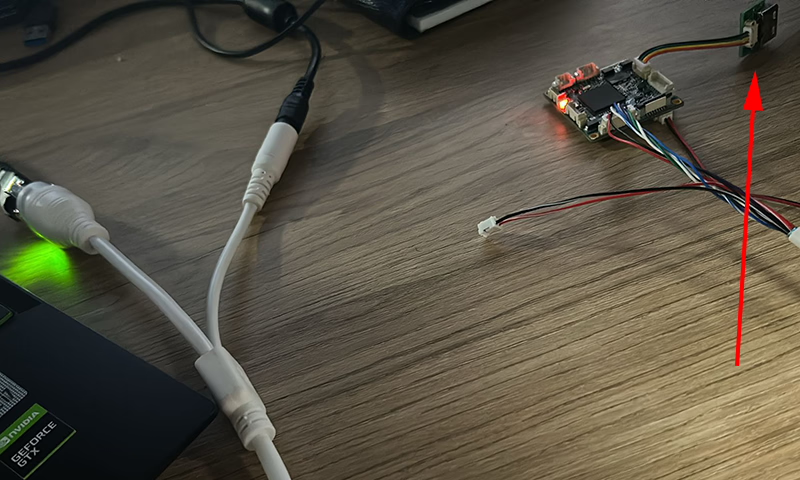
একটি: Based on the images you provided, the USB input is not connected to a camera. When there is no valid USB video source connected, the encoder cannot detect an input signal. ফলে, the device will continuously reboot while attempting to identify a USB signal source.
Please connect a USB camera to the encoder. Once a valid video input is detected, the device will operate normally and you will be able to access the web management page through the browser to modify parameters.
প্রশ্নঃ: How can I remove the time watermark displayed in the top-right corner of the network video stream?
একটি: Please log in to the web management page of the encoder.
যান Audio and Video ট্যাব, then find OSD Settings.
মধ্যে Display Time পছন্দ, uncheck the box to disable it.
After saving the settings, the time watermark will no longer be displayed in the video stream.
এনকোডার মডিউল বোর্ড








ডিকোডার মডিউল বোর্ড




কাস্টমাইজেশন জন্য উপলব্ধ
প্রশ্নঃ: What is IR_CUT mode?
একটি: IR_CUT mode supports external IR LED lights. Our encoder board can control external infrared LEDs to enhance the camera’s illumination, improving visibility in low-light or nighttime conditions. It also enables automatic switching between color (দিন) and infrared (night) মোড, allowing the camera to provide clear images in both bright and dark environments.
প্রশ্নঃ: Besides the USB to CVBS card, what other analog video outputs are supported? Does it support AHD?
একটি: এখন, this device only supports CVBS (পাল / এনটিএসসি) output and IP Ethernet RTSP video streaming. এএইচডি, TVI or other analog video outputs are not supported.





iVcan.com –
এই USB থেকে CVBS রূপান্তরকারী কর্মক্ষমতা এবং সহজে ব্যবহার উভয় ক্ষেত্রেই আমার প্রত্যাশা ছাড়িয়ে গেছে. ডিভাইসটি নির্বিঘ্নে USB ক্যামেরা ফিডকে NTSC/PAL কম্পোজিট ভিডিওতে রূপান্তর করে, যা আমার FPV ড্রোন সিস্টেমের জন্য নিখুঁত ছিল. ভিডিও কোয়ালিটি চমৎকার, এবং লেটেন্সি অত্যন্ত কম, বিলম্ব ছাড়াই রিয়েল-টাইম পর্যবেক্ষণের অনুমতি দিচ্ছে. সেটআপ দ্রুত এবং স্বজ্ঞাত ছিল, এবং কম্প্যাক্ট নকশা ইনস্টলেশন খুব সুবিধাজনক করেছে. যারা স্থিতিশীল চান তাদের জন্য আমি এই রূপান্তরকারী বোর্ডের সুপারিশ করছি, উচ্চমানের, এবং এনালগ ভিডিও সরঞ্জামের সাথে ইউএসবি ক্যামেরা একীভূত করার জন্য দক্ষ সমাধান.